Forum Widget
Back to All Guides
GET IN TOUCH
If you would like to get further information about Frog or help in getting it set up in your school please get in touch via the contact details below...
hello@frogeducation.com
Forum Widget
The Forum widget allows users to create topics for discussion within a Frog site that can be replied to by other users with Contribute rights.
Introduction
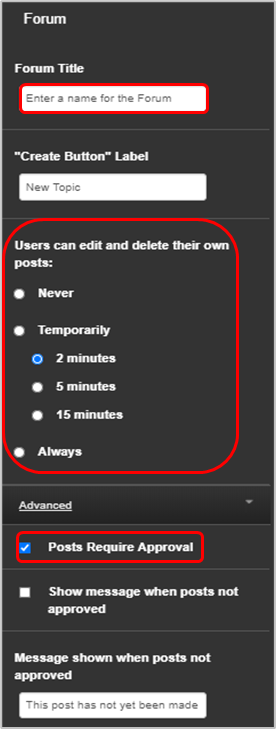
You can set whether users can edit or delete their own posts. This is set to Never by default.
The Temporarily option provides a 2, 5 or 10 minute selection, which symbolise the amount of time that users will have after posting on the forum to edit or delete their post. This is a popular option because it allows users to correct any mistakes at the point of posting, but doesn’t allow them to go in and make changes after the time limit.
You can also set the widget so that any Posts require approval before being added to the forum.
Anyone with edit and manage rights to the site can edit, delete or hide any post or thread.
You can download the entire forum or an individual thread as a CSV file should you need to.