












Back to All Guides
GET IN TOUCH
If you would like to get further information about Frog or help in getting it set up in your school please get in touch via the contact details below...
hello@frogeducation.com
What is Frog? for parents
Frog is a Learning Management System (LMS) introduced by the Department for Education to provide parents/caregivers with a world class platform for delivering teaching and learning, as well as support in accessing timely and relevant information regarding their child’s learning at every preschool and school.
How can a parent access Frog?
Before accessing Frog, parents/caregivers are required to accept an invitation into the Community Portal to establish their username and password details (find out more on creating your Community Portal Account).
What will a parent/caregiver find in Frog?
Frog is a highly flexible, providing sites with a broad number of features that enable parents/caregivers to remain informed and engaged with their child’s learning and development. Each preschool and school is different and as a result Frog can look differently as well. It depends on how a school or preschool wants to use the system. As a default parents/caregivers have access to:







Creating your Community Portal Account
The school will send you an email inviting you to create an account for Community portal. This email will be sent from noreply@schools.sa.edu.au. When you receive the email, select the link provided, and create your Community portal account.
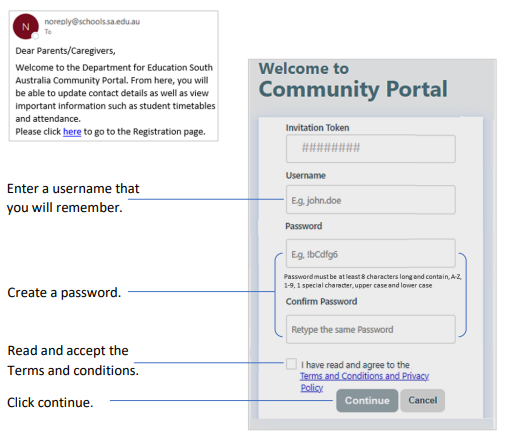
Navigating the Community Portal
Use this link to login to your Community portal: https://desa-portal.civica.education/ Once setup, a parent/caregiver can access their child(ren)'s Frog environment via the link(s) at the bottom of the Community portal page.
Activating the Community Portal
Schools and preschools wishing for support with setting up the community portal, please raise an edIT request.